
X Account Suspended: Causes, Appeal Steps, and Prevention
Got your X account suspended? Learn the top reasons, how to file an appeal that works, realistic timelines, and prevention tips creators can use to stay safe.
You open X expecting to answer a client, publish a launch update, or check yesterday's replies. Instead, the screen says your account is locked or suspended. You try the app again, then a browser, then another device, hoping the notice was a glitch. That reaction is understandable, but repeated logins, angry replies to support posts, and a rushed generic appeal usually create noise instead of evidence.
An X account suspended notice doesn't tell you enough by itself. You need to identify the enforcement tier, determine whether your recent behavior broke a rule, and then submit the type of proof that fits the situation. A genuine policy violation, a security lock, and a false-positive enforcement wave require different recovery decisions.
The Moment Your X Account Gets Locked
The first few minutes feel personal because the account represents work that took months or years to build. Your profile may carry your reputation, customer conversations, launch announcements, community relationships, and a history of replies that no replacement account can reproduce. If you manage a brand account, the interruption can also leave teammates unsure whether scheduled posts, client work, or support conversations are still running.
Start by preserving the evidence. Screenshot the exact notice, including any stated reason, restrictions, and instructions. Record the time you discovered the lock and note whether you can still view your profile, posts, messages, or settings. Don't keep testing random devices or networks. Every extra login attempt makes the timeline harder to interpret.
Practical rule: Diagnose the restriction before you try to defeat it.
X's own guidance says suspensions commonly relate to spammy or fake account behavior, security compromise, or abusive posts, and enforcement may be temporary or permanent depending on the violation. Read the official X guidance on suspended accounts before you write anything, but treat the notice itself as your primary case file.
The wrong first move
Support replies on public posts rarely replace the formal review path. A long emotional explanation also gives a reviewer more material to misunderstand, especially if you speculate about facts you haven't checked. Your first message should come after a short audit of recent posts, replies, direct messages, tools, logins, and profile changes.
The right question
Don't begin with, “How do I get my account back?” Begin with, “What kind of restriction did X apply, and what evidence would distinguish a real violation from an automated mistake?” That shift matters because an account caught in a broad false-positive event needs ownership and timing evidence, while an account that sent repetitive promotional replies needs a credible behavior correction.
The platform's enforcement history shows why this diagnostic approach matters. X reported 5.3 million account suspensions in the first half of 2024, compared with 1.6 million in the first half of 2022, an increase of about 231% across those periods, according to Fortune's coverage of X's transparency reporting. Those figures excluded spam-account removals, while X separately reported 464 million spam accounts taken offline in the first half of 2024. High-volume enforcement makes false positives possible, but it doesn't make every suspension accidental.
Suspension Types and What Each One Means
Read the notice as a classification problem. X applies different restrictions to different risks, and the wording on your screen matters more than the single word “suspended.” First identify the restriction. Then choose the recovery path that fits it, instead of filing the same appeal for every case.
A temporary lock requires a verification step
A temporary lock limits actions until you complete a requested step, such as confirming an email address, phone number, password, or suspicious-activity review. Parts of your profile may remain visible, while posting, replying, following, or messaging stays unavailable until verification succeeds.
If the screen gives you a clear way to regain access, complete that step once and save the confirmation. Do not submit a permanent-suspension appeal for a verification lock unless X sends you to that process. Your evidence should focus on account ownership, secure access, and a clear explanation of any login or activity change.
A read-only restriction blocks output
A read-only state lets you sign in and inspect the account while blocking publishing or engagement. Your profile may remain viewable, and cached posts or indexed pages may still appear to other users. Existing direct messages can also remain visible even though new messages are blocked.
Treat this restriction as a controlled pause. Review recent activity, remove connected tools you do not recognize, and follow the on-screen recovery instructions. An account that opens normally but cannot publish is different from one displaying a permanent suspension notice, so do not use the same recovery argument for both.
A full suspension blocks normal use
A full suspension stops normal account use and usually provides an appeal route. X may still show limited public profile information through cached pages, search results, or direct links. A visible profile does not prove that the account remains operational.
Your appeal must address the policy area named in the notice. For platform manipulation, explain activity patterns, tools, and account access. For abusive behavior, review the specific posts and their context. For impersonation or authenticity concerns, provide ownership and identity evidence. A false-positive enforcement wave calls for a precise timeline and access evidence. A real violation requires a credible correction, not a generic denial.
A security or verification lock puts ownership first
A phone, email, password, or account-ownership lock means X needs proof that you control the account, or suspects someone else may have access. Secure the email account first, change reused passwords, revoke unfamiliar third-party access, and preserve login alerts.
Use this matching guide:
| What you see | What it usually means | Best first action |
|---|---|---|
| Verification prompt with limited actions | Temporary lock or security review | Complete the requested verification |
| Account opens but posting or replying is blocked | Read-only restriction | Audit recent activity and connected tools |
| Clear suspension notice with appeal option | Full policy enforcement | Submit one evidence-based appeal |
| Sudden lock after unusual login activity | Account-security concern | Secure ownership and document the timeline |
Match the screen to the closest tier before contacting support. The classification determines the appeal route, the evidence to gather, and whether your priority is correcting behavior or proving that X made a false-positive decision.
Why X Accounts Get Suspended in 2026
X doesn't need to identify one bad post to restrict an account. Automated systems evaluate patterns. A creator may consider each action reasonable in isolation, while the combined sequence resembles spam, manipulation, impersonation, or a compromised account.
X told UK officials it had suspended 800 million accounts during 2024 for platform manipulation and spam, within a 12-month enforcement window, as reported by Engadget. The same reporting described enforcement at a scale far beyond earlier public transparency totals. That scale explains why your context may not be visible to the first automated decision.
Four behavior clusters to audit
Spam signals include mass following, repeated follow-unfollow loops, duplicate replies, link-heavy posting, and sudden bursts of direct messages. A growth operator may call this a funnel or distribution sprint. A classifier may see repetitive output aimed at moving users off-platform.
Authenticity signals include bought followers, coordinated engagement, bot-assisted posting, impersonation, or multiple accounts behaving as one network. Early-thread replies can be legitimate, but a repeated pattern of nearly identical replies from connected accounts looks coordinated.
Content signals cover abusive posts, threats, harassment, gated adult material, copyright violations, and civic-integrity issues. Sarcasm doesn't automatically protect a post from enforcement. Context matters to a human reader, but the post still has to survive the platform's policy and reporting systems.
Security signals include unfamiliar login geography, compromised third-party applications, unusual device changes, and API activity that doesn't match normal account use. A founder who travels, changes devices, or hands access to a new contractor should expect the account history to look different and should document those changes.
| Trigger Cluster | Specific Signal Flagged | Growth Tactic That Resembles It | Enforcement Severity |
|---|---|---|---|
| Spam and repetition | Duplicate replies, link-heavy bursts, mass follows | Follow-unfollow loops or repeated funnel replies | Restriction to suspension |
| Inauthentic activity | Coordinated accounts, bought engagement, bot-like output | Multi-account engagement and automated reply queues | Suspension risk |
| Content violations | Harassment, threats, uncensored adult material, copyright issues | Edgy promotional content or recycled media | Restriction to suspension |
| Security concerns | New locations, unfamiliar tools, account-access changes | Shared logins or rapid device switching | Verification lock to suspension |
High-growth tactics that quietly cross the line
Scheduling itself isn't the problem. The danger comes from repetition, sudden volume, identical phrasing, and unattended automation. A DM funnel becomes risky when it sends the same pitch to people who haven't shown interest. A reply system becomes risky when it publishes generic comments without reading the surrounding conversation.
Review the 48 hours before the restriction, then review the preceding week for slower patterns. Identify what changed, not only what you posted. A new tool, a revived dormant account, a launch-day burst, a sudden audience spike, or a new operator may explain the trigger better than the content of the last post.
Was It Really You or an Enforcement False Positive
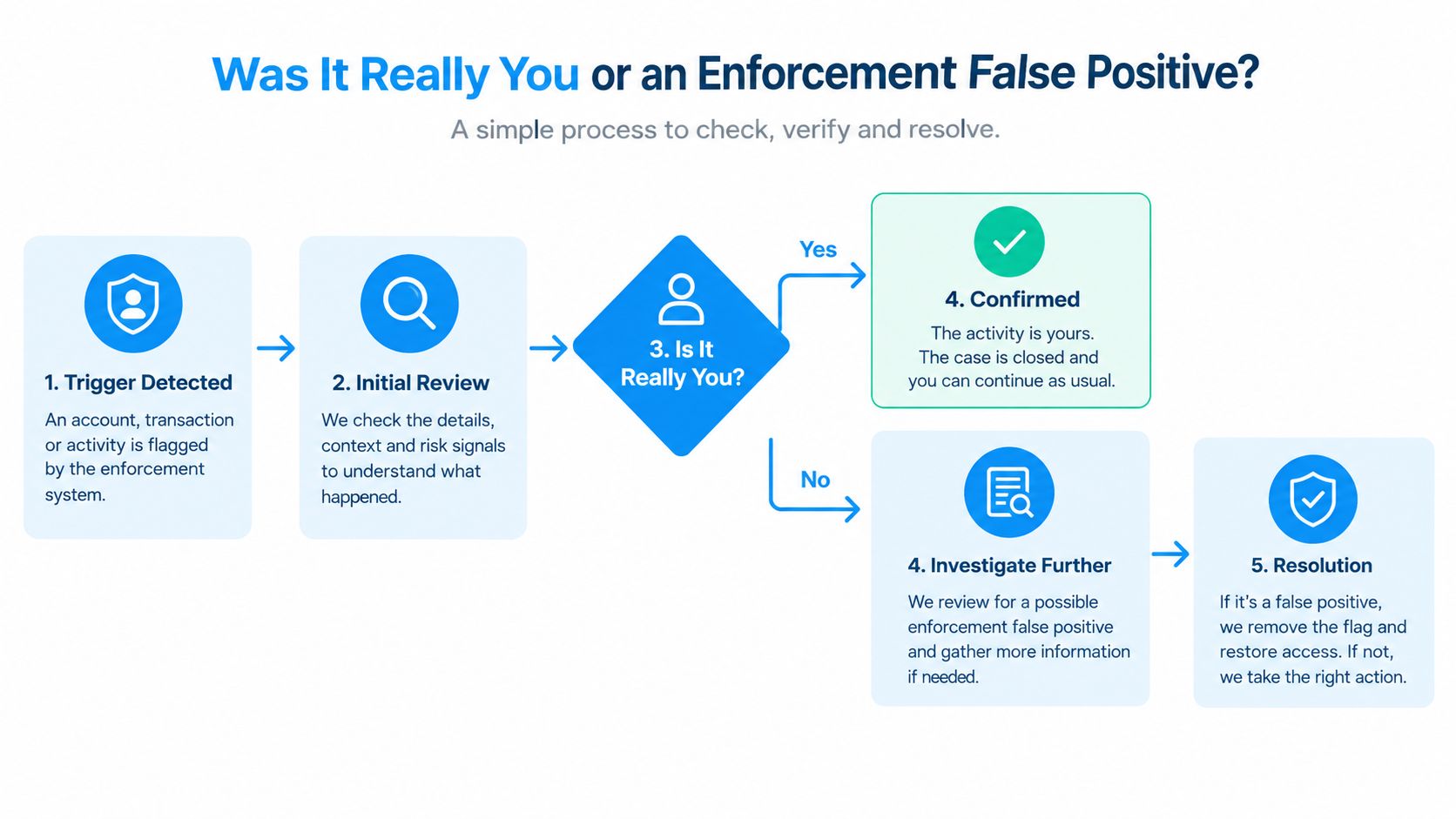
A weak appeal says, “I didn't do anything wrong.” A strong appeal demonstrates legitimate ownership, normal intent, and a plausible explanation for the signal X detected.
Recent reporting described an X spam filter that falsely flagged some accounts for about 12 hours before correction. Separate reporting on a 2026 suspension wave described enforcement aimed at “inauthentic behaviors,” while users reported receiving little explanation in denials, as covered by PiunikaWeb's account of the reported enforcement wave. These reports don't prove that your case is a false positive, but they justify checking the surrounding context before apologizing for a violation you didn't commit.
Run four audits before you write
Behavior audit: Review posts, replies, quote posts, and DMs from the period before the lock. Did you publish threats, harassment, repetitive promotions, impersonating material, or content that could violate a stated rule? If yes, identify the exact item and address it directly.
Automation audit: List every scheduler, browser extension, API integration, cross-poster, and team workflow with account access. Pause them. Note whether a tool published duplicate text, fired during an unusual burst, or continued posting after you lost access.
Access audit: Confirm that your email and phone still work. Check account-security alerts, password changes, unfamiliar sessions, and third-party permissions. “My account was hacked” carries weight only when your security records support it.
Context audit: Check whether the restriction began after a sudden follower spike, trending controversy, coordinated reports, dormant-account reactivation, or a major change in operator location. Save timestamps and screenshots rather than relying on memory.
The appeal is not an apology exercise. It is a compact evidence brief.
Match evidence to the diagnosis
If the behavior audit finds a real violation, acknowledge the specific conduct, explain the corrective action, and ask for a review based on compliance going forward. If the automation audit finds a malfunction, identify the tool, affected period, and steps taken to disable it. If the access audit points to compromise, prioritize ownership proof and security remediation. If the context audit shows a sudden system event, lead with the timeline and evidence of normal use.
For a deeper way to separate visibility filtering from a true lockout, use this X shadowban status guide once, then preserve the result with the rest of your case file.
Don't build your appeal around uncertainty. State what you checked, what you found, and what X should review.
Filing an Appeal That Has a Real Chance of Working
Use the official route shown in the suspension notice or the X account appeals form. Choose the category that matches the notice. If the account is locked for verification, complete verification first. If the account is fully suspended, use the appeal workflow rather than sending repeated requests through unrelated help categories.

Prepare the case before opening the form
Collect the handle, account email, notice screenshot, discovery time, relevant post or message links, security alerts, connected-tool details, and ownership evidence. Keep the set focused. A reviewer needs the facts that explain the enforcement signal, not a complete archive of your personal history.
Submit from the account's normal environment whenever possible. Use the associated email, the usual browser or app, and the account's ordinary connection. An appeal submitted from a different account or an unfamiliar environment can look disconnected from the owner or resemble an attempt to evade enforcement.
Use a four-part message
Write four short parts:
- Context: State the handle and when you discovered the restriction.
- Possible misread: Identify the specific behavior or policy area you believe X flagged.
- Evidence: Explain the relevant screenshots, links, account-ownership proof, security records, or tool logs.
- Request: Ask X to review the account and restore access if the evidence confirms legitimate use.
A useful structure sounds like this:
I'm appealing the suspension of @handle, discovered on [date and time]. I believe the account may have been flagged for [specific signal], but the activity was [brief factual context]. I have attached [specific evidence] showing [what it proves], and I have disabled [tool or workflow] while reviewing the account. Please review the enforcement decision and restore access if the account complies with X's policies.
Don't claim that a system error occurred unless your timeline supports it. Don't admit to spam, manipulation, or abuse just because you think an apology sounds cooperative. A false admission can make a legitimate-use case harder to assess.
Avoid the mistakes that bury good cases
- Repeated submissions: Send one clean appeal, then preserve the case number and confirmation.
- Hostile language: Insults, threats, and public pressure don't clarify the policy question.
- Irrelevant screenshots: Attach proof tied to the alleged signal, not unrelated engagement.
- Overlong narratives: Put the decisive facts near the top.
- Replacement-account activity: Don't create a new account to bypass a suspension while the case is active.
If the case stalls, use legitimate escalation channels available to your account, such as a signed support submission, an eligible partner route, or the Office of the DPO route for European accounts. Escalation should add relevant evidence, not repeat the same complaint in a louder tone.
Timelines and What to Expect After You Submit
Set expectations by restriction type, not by the emotional urgency of the incident. A verification lock may clear after you complete the requested ownership step. A policy suspension can require a longer review, and a permanent suspension may remain unresolved for an extended period.
X often communicates imperfectly. Access can return without a detailed explanation, or an email may arrive after the account has already changed status. A lack of immediate response doesn't prove that nobody reviewed the case, but it also doesn't justify sending a stream of duplicate forms.
| Suspension Tier | Typical Review Window | Reply Expectation |
|---|---|---|
| Verification or security lock | After the requested verification step | Often an on-screen result or unlock message |
| Temporary policy restriction | Short review or automated reassessment | May receive limited communication |
| Full policy suspension | Longer manual or automated review | A response may be brief or absent |
| Permanent suspension | Potentially extended review | Don't assume a detailed explanation will arrive |
What to do while waiting
Pause all connected posting and outreach tools. Keep the evidence folder intact, monitor the associated email, and check the account status without repeated login attempts. Tell clients or teammates that the channel is under review, then move urgent conversations to a backup channel you already control.
Don't open replacement accounts to continue the same activity. A new account can create a second enforcement problem, particularly if the original case involved authenticity, platform manipulation, or ban evasion concerns. Don't bombard press contacts or public support accounts either. A disciplined case file gives you a better chance than a louder campaign.
Prevention Playbook for Creators and Growth Teams
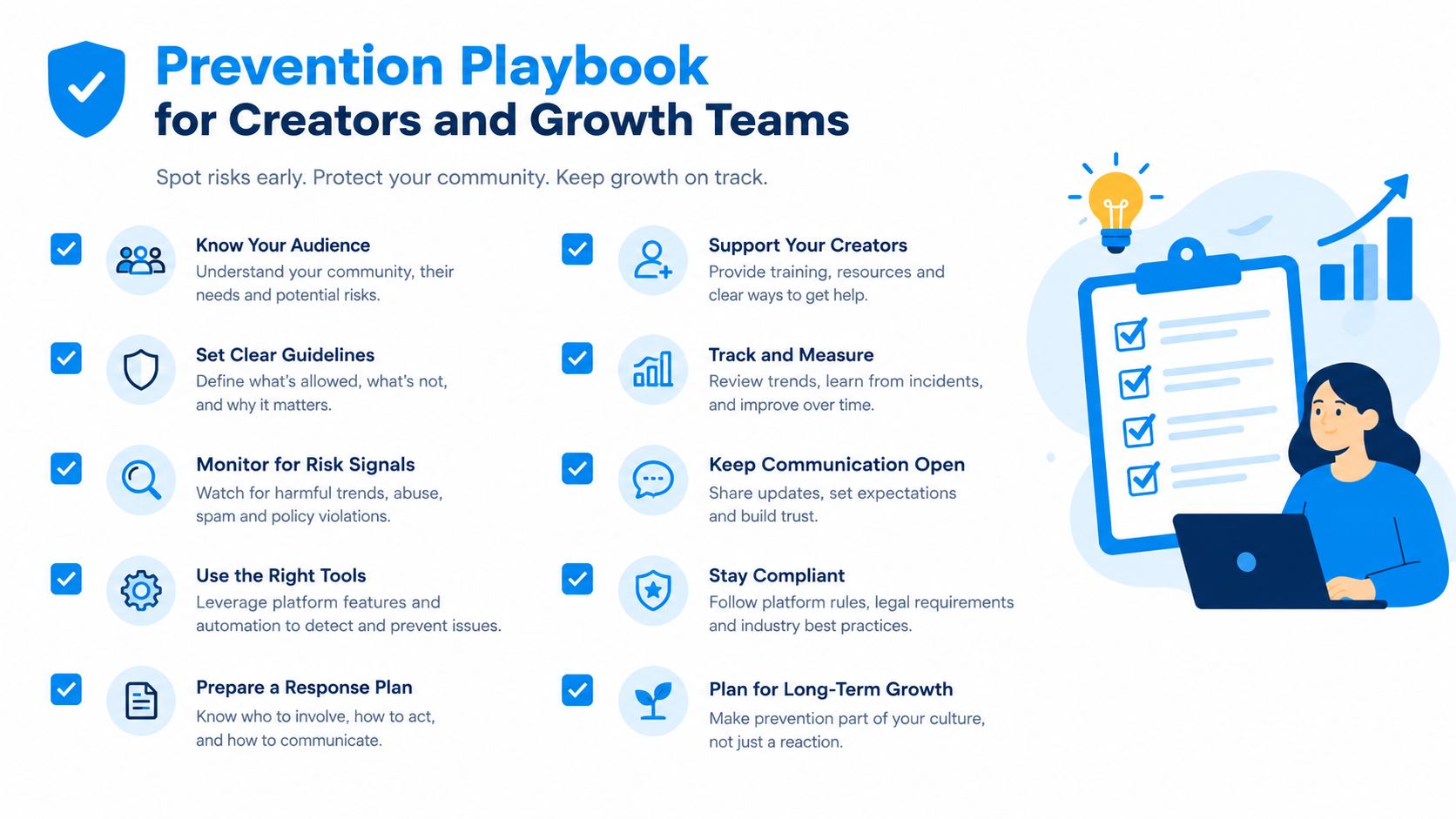
Prevention isn't about making your account inactive. It means removing the combinations that make authentic work resemble automation. The safest operating model is steady, varied, traceable, and easy for a team to explain after an incident.
Build five operating habits
Keep activity human and consistent. Avoid dormant periods followed by a sudden publishing or reply burst. If a campaign has been paused, restart gradually and review the queue before anything goes live.
Vary the work, not the identity. Rotate posts, replies, original insights, media, and conversation. Repeating one format with the same phrasing and destination link makes a legitimate campaign look mechanically generated.
Warm up new accounts. Complete the profile, establish normal reading and conversation habits, and let the account develop a credible history before adding aggressive outreach. A new account that exists only to publish promotional content has a weak trust signal.
Separate conversations from campaigns. Segment DMs by audience and intent. Personalize the opening, remove people who don't engage, and stop a sequence when recipients show disinterest. Never let a scheduler continue sending after a restriction appears.
Review account health weekly. Check account notices, connected applications, unusual login alerts, content performance, and reply quality. Keep an internal log of operators, tools, and major activity changes so you can explain an incident without guessing.
If your team manages newsletters alongside social distribution, NewsletterAsAService for marketing firms can help keep owned-channel communication separate from high-risk platform activity. That separation matters because a suspension shouldn't erase your only way to reach an audience.
Use this guide to auto-follow bots on Twitter as a warning sign, not a volume target. Follow automation and bulk engagement can turn a growth workflow into a recognizable pattern when the account's actions lack genuine conversation.
Run a short monthly audit
Open the account's connected-app list, review the most repetitive posts and replies, inspect link frequency, check team access, and compare activity against the previous month. Then ask one uncomfortable question: “If a reviewer saw only the sequence of actions, would it look like a person building relationships or a system extracting attention?”
For creators who need a single workspace for style-aware drafts, conversation discovery, scheduling, analytics, and follower-management workflows, XBurst is one option to evaluate. Keep human approval in the loop, especially for replies and outreach, and use any tool to create consistency rather than to maximize mechanical volume.
Your First 24 Hours After a Suspension
Use this order. Don't improvise.
- Screenshot the notice and record when you found it.
- Identify the tier: verification lock, read-only restriction, temporary limitation, or full suspension.
- Secure access: check the associated email, password, phone, sessions, and connected applications.
- Pause every scheduler, cross-poster, bot, and team workflow.
- Review recent posts, replies, DMs, and login changes.
- Submit one concise appeal through the correct official route, with evidence matched to the likely trigger.
- Notify clients and teammates before they assume the outage is a campaign failure.
- Move urgent conversations to email, a website, a newsletter, or another owned channel.
Don't create a replacement account to bypass the restriction. If you use bulk workflow tools, review how to bulk unfollow on Twitter before restarting any follower-management process, and remove aggressive automation from the recovery plan.
If the first appeal receives no meaningful response, preserve the case record and use an appropriate formal escalation route once. If the evidence shows a real violation and restoration remains unavailable, stop trying to recreate the same behavior and rebuild your audience through owned channels. Your next account, if permitted, should launch with a documented access policy, slower activity ramp, and a backup communication system already in place.
XBurst helps creators, founders, and social teams analyze their writing style, find high-opportunity conversations, draft on-brand posts and replies, schedule consistently, and monitor engagement without turning growth into a blind automation sprint. Visit XBurst to review the workflow and start rebuilding a safer, more measurable X presence.